

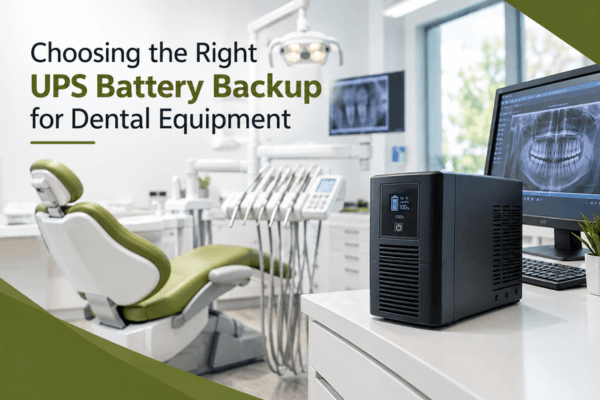

Dental practices depend on sophisticated technology to deliver safe, efficient, and uninterrupted patient care. From digital X-ray systems and dental chairs to computers and practice management software, even a brief power interruption can disrupt appointments and risk valuable equipment. Choosing the right UPS battery backup for dental equipment is therefore an important part of a reliable dental IT strategy.
A properly selected uninterruptible power supply (UPS) helps protect sensitive electronics from power fluctuations, provides temporary battery power during outages, and gives staff time to save work or shut down systems safely. However, not every UPS is suitable for every dental device. Understanding your equipment, power requirements, and backup goals is essential before making a purchase.
Why Dental Practices Need Reliable UPS Battery Backup
Modern dental offices rely on interconnected electrical and digital systems. A sudden outage can interrupt imaging, stop computers from functioning, disconnect network equipment, or leave important patient records temporarily inaccessible. In addition, voltage surges and electrical noise may affect sensitive components over time.
A UPS provides three essential benefits:
-
Backup power: Keeps connected equipment running temporarily during an outage.
-
Surge protection: Helps defend electronics against certain voltage spikes.
-
Safe shutdown time: Allows staff to save data and power down equipment properly.
However, a UPS is not a replacement for a generator or a complete business continuity plan. Instead, it serves as an important first line of defense against power-related disruptions.
How to Choose the Right UPS for Dental Equipment
Selecting a UPS requires more than checking its battery capacity. The ideal solution depends on the equipment being protected and the level of continuity your practice needs.
1. Identify the Equipment That Needs Protection
First, create an inventory of the dental equipment and IT systems that require backup power. These may include:
-
Digital X-ray and imaging workstations
-
Intraoral camera computers
-
Dental practice management systems
-
Network switches, routers, and servers
-
Reception and treatment-room computers
-
VoIP phone systems
-
Selected diagnostic or monitoring equipment
Not every device necessarily needs to be connected to a UPS. For example, large dental chairs, compressors, sterilizers, and other high-power equipment may require specialized electrical planning rather than a standard office UPS. Therefore, consult the equipment manufacturer and a qualified electrician before connecting clinical devices.
2. Calculate Power Capacity and Runtime
Next, determine how much power your equipment consumes. UPS capacity is commonly expressed in VA (volt-amperes) and watts. The UPS should support the combined load of the connected devices without operating at its maximum limit.
Runtime is equally important. A UPS designed to keep a workstation running for several minutes may be sufficient for safe shutdown, while a critical server or network system may require longer coverage.
For example, if a computer, monitor, and network device together consume 300 watts, choose a UPS that can comfortably support that load. Additionally, review the manufacturer’s runtime chart because battery duration varies depending on the connected load.
3. Consider the UPS Type
Different UPS designs offer different levels of protection:
|
UPS Type |
Best Use |
Key Consideration |
|---|---|---|
|
Standby UPS |
Basic computers and non-critical devices |
Suitable for simpler backup needs |
|
Line-interactive UPS |
Dental office computers and networking equipment |
Helps regulate voltage fluctuations |
|
Online UPS |
Highly sensitive or mission-critical systems |
Provides continuous power conditioning |
For many dental IT environments, a line-interactive UPS may offer a practical balance between protection, performance, and cost. However, online UPS systems may be more appropriate for particularly sensitive equipment or environments with unstable power. Ultimately, the correct choice depends on the manufacturer’s requirements and your practice’s risk tolerance.
Important Features to Look For
Beyond capacity and UPS type, several features can improve reliability and usability.
Pure Sine Wave Output
Some electronic devices and power supplies perform better with pure sine wave output. This feature can be especially relevant when protecting sensitive computers, networking equipment, or systems with active power factor correction (PFC). Always verify compatibility with the equipment manufacturer.
Automatic Voltage Regulation
Automatic voltage regulation (AVR) helps correct certain low- and high-voltage conditions without relying entirely on battery power. Consequently, it can extend battery life while providing more stable power to connected devices.
Monitoring and Alerts
Network management capabilities, USB connectivity, and audible alerts can help staff monitor UPS status. In addition, automated shutdown software can reduce the risk of data corruption when an outage lasts longer than the battery runtime.
Replaceable Batteries and Scalability
Choose a UPS with accessible replacement batteries and a support lifecycle that suits your practice. Moreover, if your dental office plans to add imaging systems, workstations, or servers, consider whether the UPS solution can scale with future needs.
UPS Maintenance and Dental IT Best Practices
Even a high-quality UPS requires regular maintenance. Test backup functionality according to the manufacturer’s recommendations, inspect battery health, and replace aging batteries when necessary. Keep the UPS in a clean, ventilated location, and avoid overloading its outlets.
Furthermore, UPS protection should be part of a broader dental IT plan. Regular backups, secure networking, endpoint protection, and documented outage procedures help ensure that your practice can recover quickly when unexpected problems occur.
At MVP IT, we understand that dental practices need dependable technology to keep their operations running smoothly. Our team can help assess your IT environment, identify critical systems, and recommend practical solutions for power protection, network reliability, and business continuity.
Frequently Asked Questions
1. What is the best UPS for dental office computers?
A line-interactive UPS is often a practical option for dental office computers and networking equipment. However, the right model depends on the equipment’s power requirements, runtime needs, and manufacturer recommendations.
2. Can a UPS power a dental chair during an outage?
A standard UPS is generally not intended to power high-consumption equipment such as dental chairs, compressors, or sterilizers. Instead, consult the equipment manufacturer and a qualified electrician for appropriate backup-power solutions.
3. How long should a dental UPS last during a power outage?
Many UPS systems are designed to provide enough runtime for brief interruptions or a safe shutdown. The actual duration depends on the battery capacity and connected load, so review the manufacturer’s runtime specifications.
4. How often should UPS batteries be replaced?
Battery lifespan varies by model, operating conditions, and usage. Therefore, follow the manufacturer’s maintenance guidance and monitor battery health rather than relying only on a fixed replacement schedule.
5. Can MVP IT help with dental IT power protection?
Yes. MVP IT can help dental practices evaluate their IT infrastructure and plan reliable solutions for equipment protection, network availability, backups, and business continuity.
Protect Your Dental Practice with MVP IT
Reliable power protection is a practical investment in your dental practice’s equipment, data, and daily operations. By evaluating power needs, selecting the appropriate UPS, and maintaining a complete IT continuity plan, you can reduce avoidable disruptions and protect critical technology.
Ready to improve your dental office’s IT reliability? Contact MVP IT for dependable dental IT services and tailored technology solutions.
MVP IT 📍 3850 19 St NE Bay 5, Calgary, AB T2E 6V2 📍 14065 Victoria Trail NW #211, Edmonton, AB T5Y 2B6 📞 (587) 585-6871